Trades and agents who need the plan and the measurement for work
What to check before choosing
On site, what matters is that the work is saved and the measurement can be checked. The reviews help choose what to test, but they do not establish the accuracy of any device or app.
Which apps people use
These apps are mentioned in the breakdown of this job. Open each one to compare strengths and limits. The order of the list is not a ranking of fitness.
Rank 19. Review score: 52 out of 100. App Store rating: 4.7★ · 40,625 ratings
52of 100
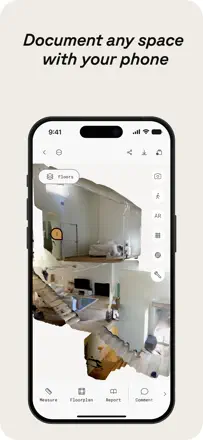
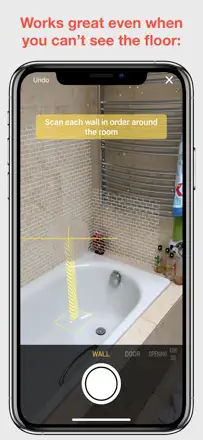
Pros value the speed of getting a floor plan via LiDAR and being able to capture a space and work off the measurements later. But the interface scares off beginners, and recent versions removed manual corner selection, so the same scan gives different square footage and you can't trust it. Add no autosave during scanning and confusion over billing that was pitched as one-time.
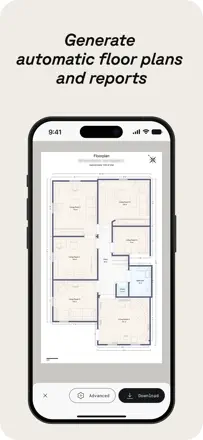
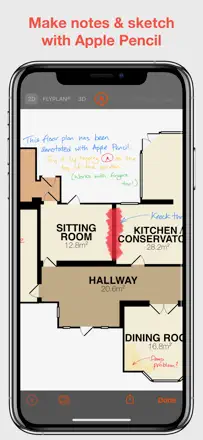
Praised: Quickly builds a floor plan via LiDAR, capture a space and work off measurements later, good measurement accuracy
Complaints: Interface scares off beginners, manual corner selection removed, same scan gives different square footage, no autosave while scanning, one-time-purchase vs subscription confusion
Best for: Tradespeople and realtors who need a fast floor plan and on-site measurements and can handle a tricky interface
Rank 7. Review score: 60 out of 100. App Store rating: 4.7★ · 42,607 ratings
60of 100
For pros this is a strong tool: fast and accurate LiDAR, realtors scan homes, film crews and archaeologists capture spaces, and the open output format gets praise. But the company keeps reshuffling tiers and pushing needed features into pricey plans, the price multiplied, and the promise to grandfather long-time users was broken. Add crashes during work scans.
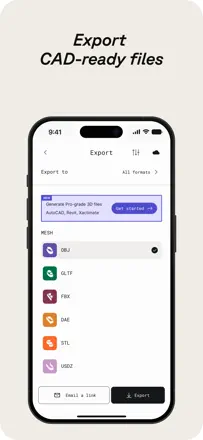
Praised: Fast and accurate LiDAR scanning, works for realtors, film and archaeology, open output format, more accurate than competitors
Complaints: Features keep moving into pricey tiers, price multiplied, long-time users not grandfathered, frames capped at six megapixels, crashes during work scanning
Best for: Professionals like realtors, kitchen designers and set builders who need accurate measurements and 3D scans and will pay
Rank 16. Review score: 55 out of 100. App Store rating: 4.7★ · 8,609 ratings
55of 100
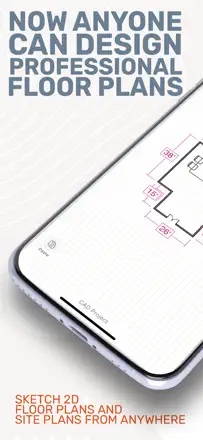
Pros doing kitchen and bath layouts love it for the intuitive interface, LiDAR measuring and the fact that clients and on-site subs understand the plans. But it's expensive, and the 10-11 dollar basic plan has no layers and no DWG import or export, so many call it overrated next to SketchUp at the same price. And there's no free plan at all, it asks for your data and forces a subscription right after the tutorial.
Praised: Intuitive interface, LiDAR room measuring, clear plans for clients and subs, constantly improving tools
Complaints: Expensive, basic plan has no layers or DWG import/export, no free plan, demands data and a subscription up front, re-asks you to pick a plan on login
Best for: Contractors and kitchen, bath and cabinet designers who make plans for clients on site and are willing to pay
Rank 2. Review score: 68 out of 100. App Store rating: 4.6★ · 1,389 ratings
68of 100
Flooring pros value this as the best estimating tool for carpet and floors: measure on site, and the plan is instantly in the office for a quote and material order, and it counts even floating stairs accurately. It breaks on reliability and small things: it freezes mid-measure and erases all the work, there is no inches-only mode, exporting diagrams is heavy, it is pricey for occasional use and has a long learning curve. Some report they could not cancel billing for months.
Praised: Best estimating tool for carpet and floors, field measuring with the plan straight to the office, accurate stair calculation including floating stairs, saves time on quotes, many jobs on iPad
Complaints: Freezes mid-measure and erases all work, no inches-only measurement mode, clunky diagram export, long learning curve, pricey for occasional use, login trouble after registration
Best for: Flooring pros who need field measuring and an instant office quote
Rank 8. Review score: 60 out of 100. App Store rating: 4.3★ · 4,955 ratings
60of 100
Quickly sizing up a room by holding the phone to the walls genuinely works for people, and the developer replies fast and helps personally. But on non-rectangular rooms, bay windows, corner fireplaces and archways it all falls apart: walls are hard to place, corners hard to square, and rooms hard to merge into one plan. Plus complaints about a sharp price hike and paid Pro sometimes not being recognized.
Praised: Fast room measurement with the phone, simple scanning, responsive developer who fixes issues in hours, kept for years for convenience
Complaints: Breaks on non-rectangular rooms, bay windows and archways, hard to square corners and merge rooms into a plan, crashes when scanning several rooms, paid Pro not always recognized, sharp price increase
Best for: For people quickly measuring simple rectangular rooms for a remodel who don't work with complex geometry
Rank 24. Review score: 45 out of 100. App Store rating: 4.4★ · 4,906 ratings
45of 100
Havenly is valued for its live designer who picks furniture to your taste and sends a 3D rendering of the room before you buy, and many genuinely love that. But the app itself lags, crashes and is nearly unusable for chatting with your designer, pushing people to the browser. Worse, some designers in the catalog left long ago, calls get cancelled, and support takes days.
Praised: Live designer picks furniture to your taste, 3D room rendering before buying, inspiration and style guidance, buying furniture right in the service
Complaints: App lags crashes and won't let you chat with the designer, dead designer profiles in the catalog, cancelled and no-show calls, slow support, long delivery times
Best for: For people who want to work remotely with a live designer and buy furniture end-to-end and can tolerate a clunky app for it
Rank 17. Review score: 55 out of 100. App Store rating: 4.6★ · 3,740 ratings
55of 100
Designers love Morpholio Board for beautiful mood boards with pricing that you're not ashamed to show a client, and for the snipping tool and Pinterest link. It breaks on stability and sync: the app often crashes on dense multi-page boards, sometimes doesn't save the work, and won't sync boards between iPhone and iPad, forcing you to rebuild the same thing. Many basic features like cropping and background removal are locked behind payment.
Praised: Beautiful mood boards for clients, snipping tool with pricing on a sheet, Pinterest link, easy to assemble furniture that matches, responsive support
Complaints: Often crashes on dense multi-page boards, won't sync boards across devices, sometimes doesn't save work, cropping and background removal locked behind payment, interrupts audio on the phone
Best for: For interior designers and enthusiasts who need clean mood boards with pricing and a Pinterest link