These apps are mentioned in the breakdown of this job. Open each one to compare strengths and limits. The order of the list is not a ranking of fitness.
Rank 1. Review score: 74 out of 100. App Store rating: 4.9★ · 13,453 ratings
74of 100
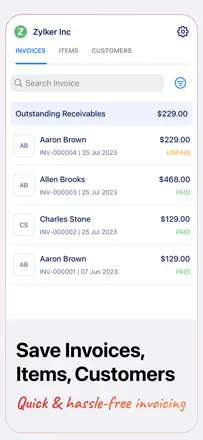
Zoho Invoice is free with no cap on the number of invoices and grows with your business: when you need more, the path to Zoho Books is smooth. PDFs look clean and professional without any configuration. Weak spots: no deposit field, the timer breaks when you use the app and the web at the same time, and template customization is minimal.
Praised: Completely free with no invoice limits, clean PDF output, and a direct migration path to Zoho Books when you outgrow it.
Complaints: No deposit payment field, the timer conflicts when running both the mobile and desktop clients simultaneously, and template customization is very limited.
Best for: Early-stage entrepreneurs and solo operators who need a professional-looking invoice without paying for a subscription.
Rank 4. Review score: 63 out of 100. App Store rating: 4.9★ · 17,036 ratings
63of 100
Zoho Invoice Generator is a free invoice maker from Zoho, which is itself a strong market position. It handles the basics: line items, tax, PDF, sending. Downsides: you can't split tax rates on a single invoice (for example, different rates for goods and labor), the item list doesn't support deactivating entries (only a workaround in settings), and there's no client signature field. Sharing the PDF directly to WhatsApp requires an extra step.
Praised: Completely free with no invoice cap, clean PDF output, and quick to start without entering a card.
Complaints: A single tax rate applies to the whole invoice you can't set different rates for goods and services in the same document.
Best for: Freelancers and small contractors who need a free tool with no subscription and no complexity.
Rank 14. Review score: 52 out of 100. App Store rating: 4.9★ · 16,503 ratings
52of 100
The app has real depth: photos attached to individual line items, signature on delivery, and multiple send channels. But estimate-to-invoice conversion in one tap still hasn't shipped, and there's no deposit payment mechanism that carries over to the final invoice contractors with multi-stage payments have to do it by hand.
Praised: A photo on each line item builds client confidence by showing exactly what they're paying for, multiple send channels, and a signature-on-delivery feature.
Complaints: No deposit payment that rolls into the final invoice, no convert-estimate-to-invoice button, and payment gateway data sometimes conflicts with the user's own settings.
Best for: Contractors and service businesses with straightforward single-stage billing who want to show clients photos of the completed work.
Rank 12. Review score: 53 out of 100. App Store rating: 4.9★ · 27,005 ratings
53of 100
Easy Invoice Maker is simple and fast for the basic case. It supports multiple service types (lawn care, handyman work) with separate tax rates uncommon flexibility. But: landscape mode was removed in an update (iPad users are frustrated), logos sometimes don't show up on the client's end, and there's no way to export a period report to PDF or Excel for tax purposes. The built-in mechanism for collecting five-star reviews using AI-generated text is a reputational risk.
Praised: Multiple service types with different tax rates on one invoice, and an intuitive interface with no unnecessary steps.
Complaints: Landscape mode was removed in an update, breaking the workflow for iPad users. No summary report export for tax purposes.
Best for: Self-employed workers with multiple service types (like lawn care and repairs) who need a simple invoice with split tax rates.
Rank 8. Review score: 58 out of 100. App Store rating: 4.4★ · 6,584 ratings
58of 100
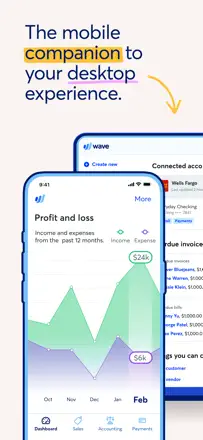
Wave used to be the gold standard for free small-business accounting, but after a monetization pivot most features moved behind a paywall. The remaining free tier is too thin for real work. The desktop version is significantly more capable than the mobile app.
Praised: Invoice and estimate creation works well: professional PDFs, built-in late-payment reminders for clients, and a notification when a client opens an invoice. Accountants note that the bookkeeping logic is cleaner and more correct than QuickBooks.
Complaints: The mobile app is a stripped-down shell: account balances are unavailable without desktop, and categorizing transactions requires scrolling the entire list from the top after each save. Bank transaction sync breaks periodically and support goes quiet.
Best for: Freelancers and micro-businesses who need integrated bookkeeping and invoicing in one place and are okay working mostly through a browser.