Keep a detailed record of every purchase by hand, build a personal financial archive over years, and never give third-party services access to the bank account.
Entering things by hand is useful for people who want to notice every purchase. Fast entry, a category that makes sense and the ability to keep an archive of one’s own all matter.
Which apps people use
These apps are mentioned in the breakdown of this job. Open each one to compare strengths and limits. The order of the list is not a ranking of fitness.
Rank 1. Review score: 85 out of 100. App Store rating: 4.8★ · 2,802 ratings
85of 100
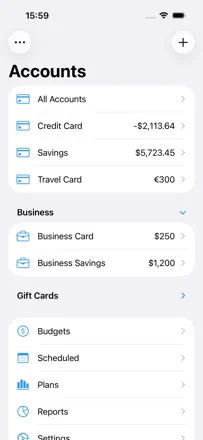
The most feature-rich manual tracker in the lineup: multiple accounts, subcategories, budgets, detailed charts, a web viewer for desktop, and a one-time purchase. No bank connection. that is a deliberate developer choice. Users with 3-5 years of experience call it the best app on their phone.
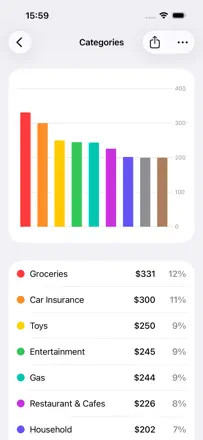
Praised: Deep customization without sacrificing entry speed. Built-in charts by category, account, and period give a complete picture of finances without bank access. Data is kept for years without loss.
Complaints: No split transactions (splitting a purchase across two categories is not possible). No real-time cross-device sync. Recurring transactions sometimes do not show in the calendar.
Best for: Disciplined users who prefer full control through manual entry and are not willing to grant bank access to third-party apps.
Rank 4. Review score: 80 out of 100. App Store rating: 4.8★ · 2,326 ratings
80of 100
One of the most honest manual expense registers on the market. A solo developer has maintained the app for years, responds to user requests, and iCloud sync works reliably. No automatic bank connection, but most users see that as a feature.
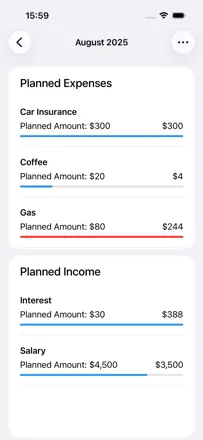
Praised: Scheduled transactions provide a running balance forecast for any future date. Sync across iPhone, iPad, Mac, and Apple Watch via iCloud is stable. An active developer who responds personally and quickly.
Complaints: No automatic bank transaction import. everything is entered manually. The iOS version has fewer features than the macOS version. Some duplicate transactions have appeared after updates.
Best for: People who do not want to give the app bank access and are happy to enter expenses manually, but expect reliable sync across Apple devices and a balance forecast.
Rank 5. Review score: 79 out of 100. App Store rating: 4.8★ · 19,219 ratings
79of 100
Spending Tracker does one thing: manual entry of every expense with an instant balance update. The act of conscious entry is itself the mechanism for spending awareness. No bank sync, so no anxiety about data privacy.
Praised: Manually entering every expense creates real spending awareness: many users understand for the first time in years where their money goes. No account link required: full control and data privacy. Weekly and monthly budgets with color-coded overspending indicators work without any setup.
Complaints: Multi-device sync via Dropbox is unstable and requires manual file management. No automatic bank transaction import: everything is manual, which becomes tedious with a high transaction volume. Budget categories cannot be capped by amount within a period.
Best for: Anyone who wants to understand their spending through conscious manual tracking and is not willing to give the app access to their bank account. Especially suited for those who have tried sync and been let down.
Rank 14. Review score: 74 out of 100. App Store rating: 4.7★ · 4,934 ratings
74of 100
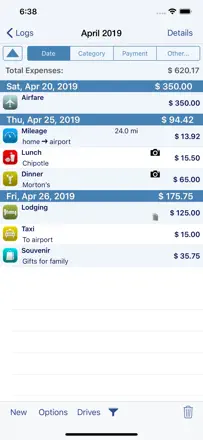
A mature business expense tracker with deep template customization, multi-currency support, and receipt photos. One-time purchase. Valued for developer responsiveness and a stable database going back to 2010. Tailored for travel expense reports.
Praised: Users have kept data intact since 2010 without loss. The developer creates custom templates on request and replies to emails personally. Fast entry of multi-currency expenses.
Complaints: Automatic mileage tracking occasionally misses entire days. The interface feels cluttered under fast entry conditions. Pop-up review requests appear too frequently.
Best for: Freelancers, sole traders, and business travelers who need detailed expense tracking for tax purposes or employer reimbursement.