People planning their spending until the next income
What to check before choosing
It has to be clear which bills are already accounted for in the available amount and how it will change before the next income. An opaque formula forces a person to recalculate everything themselves.
Which apps people use
These apps are mentioned in the breakdown of this job. Open each one to compare strengths and limits. The order of the list is not a ranking of fitness.
Rank 2. Review score: 82 out of 100. App Store rating: 4.7★ · 4,841 ratings
82of 100
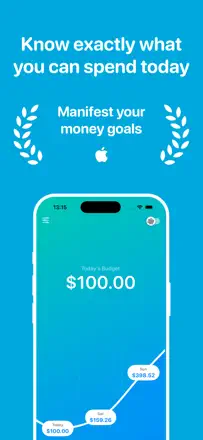
A minimalist daily budget planner: you enter income, fixed expenses, and a savings goal, and the app divides the remainder across the days of the month, showing how much you can spend today. No bank connection required. Radically simple, but that is exactly why most users finally stick to a budget after years of failing with other apps.
Praised: The live 'available today' figure changes spending psychology: not 'how much is left this month' but 'how much do I have right now.' Users with ADHD and financial anxiety specifically highlight this mechanic.
Complaints: No balance forecast for future dates. Variable income (freelance, shift work) fits the model poorly. No balance carryover between months.
Best for: People with a fixed income who tend to spend everything at the start of the month and want a simple guide for 'how much can I spend today.'
Rank 3. Review score: 81 out of 100. App Store rating: 4.8★ · 554 ratings
81of 100
A daily-balance budgeter: enter your income and fixed expenses, and the app splits the free money across days to show how much you can spend today. Works especially well for people prone to impulse spending.
Praised: A single 'how much is left today' figure gives instant clarity on your financial state. Multi-budget support. Apple Watch widget. One-time purchase.
Complaints: Recent updates broke the savings-goal logic. No data import from other apps. Initial setup takes considerable effort.
Best for: Anyone who wants to stay within a monthly budget without dealing with categories, especially people prone to impulse spending or those with attention-deficit disorder who need one simple number.
Rank 18. Review score: 72 out of 100. App Store rating: 4.6★ · 1,798 ratings
72of 100
A minimalist envelope-style budget tracker: set a limit for a period, subtract expenses manually, see the balance. Supports weekly and biweekly periods, which is uncommon. No bank sync and no future balance forecast.
Praised: One glance at the screen shows how much is left today and for the month. Arbitrary budget periods to match any pay schedule. Clean design.
Complaints: No balance forecast for future dates. Occasional freezes when adding records. The balance carryover feature was changed without notice in one update.
Best for: People who need simple weekly or biweekly spending control without tracking their entire financial life.
Rank 10. Review score: 76 out of 100. App Store rating: 4.8★ · 3,620 ratings
76of 100
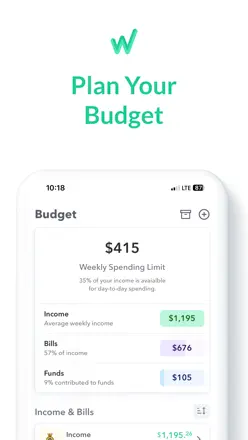
A budgeter that splits monthly income into weeks, accounting for bill due dates. The core idea: not 'how much is left this month' but 'how much is safe to spend this week.' Supports bank sync. Users call it the best they have tried after Mint, YNAB, and EveryDollar.
Praised: The weekly 'safe to spend' figure changes behavior: users stop blowing everything at the start of the month. Simple, without overwhelming detail.
Complaints: Bank sync broke in 2023 and remains unstable. The weekly balance calculation breaks when several large bills fall in the same week. Budget sharing with a partner is limited.
Best for: People who think about money weekly and find monthly budgets unhelpful because they tend to overspend in the first days after payday.