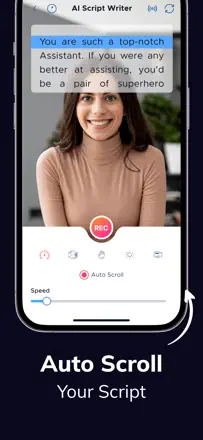
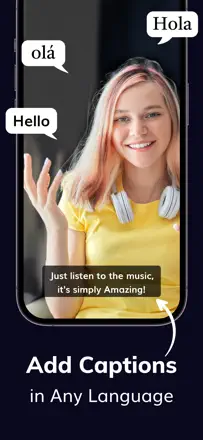
Build a teleprompter into the workflow on an ongoing basis: mirroring for a hardware rig, remote control, sync between iPad and iPhone, stable recording without glitches on a shoot or on stage
Authors ask for a saved speed and stable syncing. A separate run-through of the script after the text or the device changes would help.
Which apps people use
These apps are mentioned in the breakdown of this job. Open each one to compare strengths and limits. The order of the list is not a ranking of fitness.
Rank 6. Review score: 62 out of 100. App Store rating: 4.7★ · 15,085 ratings
62of 100
People love it for smooth scrolling and remote control, and they pull it into all kinds of scenarios from recording video to song lyrics at live concerts. But some hit breakage after updates: syncing between devices jumps and drops out with hours of work lost, uploaded songs disappear from folders, and the set speed isn't remembered. Importing multiple scripts and arranging them into folders is clumsy.
Praised: Smooth scrolling, best external remote control, works for voiceover and song lyrics, Bluetooth foot-pedal integration, intuitive on a shoot
Complaints: Sync between devices breaks with lost work, uploaded songs disappear, set speed not remembered, clumsy import and folder arrangement of scripts, glitches after updates
Best for: People who work a lot from a remote: video creators, musicians with song lyrics on stage, and prompter operators on shoots
Rank 24. Review score: 45 out of 100. App Store rating: 4.6★ · 11,250 ratings
45of 100
People buy this app for one thing: scrolling follows your voice, pausing when you pause, and it feels like magic compared to plain teleprompters. But lately it's gotten glitchy: voice scrolling regularly stalls or lags, text and camera load slowly, and the screen freezes and won't save video. It also annoys people with a subscription price for what used to be a one-time buy, and it works noticeably worse on Android than on iPad.
Praised: Scrolling follows your voice with pauses, saves a solo creator's nerves, works great in quiet, reliable on iPad, pairs with a teleprompter rig
Complaints: Voice scrolling stalls and lags, slow loading of text and camera, freezes without saving video, expensive subscription instead of a one-time buy, weak on Android
Best for: Solo creators and speakers who care about voice-driven scrolling without setting a speed, especially on iPad and in a quiet setting
Rank 5. Review score: 63 out of 100. App Store rating: 4.6★ · 1,237 ratings
63of 100
Experienced presenters and shooters value it for the core of a teleprompter: editing the script on the fly, adjusting speed and font size, text right above the lens for eye contact, working with both a formal teleprompter and a tablet on a stand. But the details spoil it: script import is very clunky, renaming scripts scrambles names and texts, and the promised Bluetooth keyboard hasn't worked for many for years. It also has no built-in video recording, you need a second app.
Praised: Editing the script on the fly, speed and font-size control, text above the lens for eye contact, works with a formal teleprompter and a tablet on a stand, 4k recording
Complaints: Clunky script import, renaming scrambles names and texts, Bluetooth keyboard broken for years, no built-in recording so you need a second app, awkward speed steps
Best for: Presenters, hosts and people shooting talking-head video who need a reliable teleprompter with on-the-fly editing, if clunky script import isn't a dealbreaker.
Rank 7. Review score: 62 out of 100. App Store rating: 4.4★ · 1,490 ratings
62of 100
People use it to learn lines and film talking-head clips: students submit video assignments, creators record short updates, the audio is clean, and it's easy to learn. It stumbles on recording and money: for some an error pops up when uploading a finished clip, video downloads cropped, a FoxCue logo lands in the intro, and downloading your own clip is locked behind a subscription.
Praised: Helps learn lines fast, simple talking-head recording, clean audio, handy for school video assignments and work updates, lots of styling options
Complaints: Error when uploading a finished clip, video downloads cropped without the full frame, FoxCue logo in the intro, downloading your own clip locked behind a subscription, crashes and a nagging rate prompt between takes
Best for: Students and creators who need to learn lines and film a tidy talking-head clip for school or social
Rank 11. Review score: 60 out of 100. App Store rating: 4.8★ · 6,388 ratings
60of 100
People praise it for the teleprompter, script sync across devices, and speed control from a Bluetooth remote, and they use it even for weekly church filming. The weak spots are concrete: the advertised green screen doesn't work right for many, it crops and zooms the background oddly, audio desyncs with external mics like DJI, and there's no voice scrolling or 60 fps recording. Plus a confusing multi-app setup with add-on purchases.
Praised: Teleprompter for filming, script sync across devices, speed control from a Bluetooth remote, simplicity paired with a mic and remote, good camera
Complaints: Green screen doesn't work as promised, odd background cropping and zoom, audio desync with external mics, no voice scrolling or 60 fps, confusing add-on purchases
Best for: People who regularly film talking-head clips with a remote and external mic, for example for church or a YouTube channel
Rank 12. Review score: 60 out of 100. App Store rating: 4.6★ · 553 ratings
60of 100
A powerful teleprompter with video recording, AI audio cleanup and subtitles, and the prompter can be moved under the camera, which many like. The main shared anger is about money: you're only warned about payment when you go to download the video after an hour of recording, and the footage just gets stuck inside. On the technical side, recording crashes around the thirty-second mark, voice scroll reacts to any noise rather than speech, and recorded takes sometimes vanish.
Praised: Prompter moves under the camera, AI audio and background cleanup, accurate subtitles, speed control, lots of post-processing tools
Complaints: You only learn about payment at download after an hour of recording, recording crashes around thirty seconds, voice scroll reacts to noise not speech, recorded takes disappear, expensive monthly price
Best for: People who regularly shoot talking videos from a script and want a prompter with recording and audio cleanup