The event becomes a reason to spend time together. It helps to find the object in advance, prepare an observing plan that makes sense and check access to the features needed.
Quelles apps les gens utilisent
Ces apps sont mentionnées dans le décryptage de cette tâche. Ouvre chacune pour comparer les points forts et les limites. L’ordre de la liste n’est pas un classement d’adéquation.
Rang 14. Note des avis : 60 sur 100. Note sur l’App Store : 4,8★ · 73 360 notes
60sur 100
Sky Tonight is valued as a teaching app: lots of info, meteor-shower dates, explanations of phenomena, and people say they learned a lot. But lately it lets them down on reliability and accuracy: for some it freezes within half a minute, shows planets in the wrong constellations, and inflates the visibility index to 95% when the weather is clearly otherwise, plus ads get in the way of even finding your feet.
Points forts : Educational content and explanations of phenomena, meteor-shower dates, lots of info on planets and the Moon, useful for astronomy beginners
Reproches : Freezes and becomes unusable within 30 seconds, planets in wrong constellations, inflated visibility index in bad weather, heavy ads while trying to learn it, confusing navigation, murky 'free' trial
Pour qui : Beginning astronomy enthusiasts who want to learn and catch meteor showers
Rang 33. Note des avis : 48 sur 100. Note sur l’App Store : 4,6★ · 94 145 notes
48sur 100
Star Walk 2 Plus is liked for how easy it is to aim at the sky and find stars, satellites and planets with info, and the music adds atmosphere. But people are infuriated by the core contradiction: even in the paid Plus version ads pop up on every zoom and freeze the map, and newcomers struggle to tell what's even on the screen or how to find a specific star.
Points forts : Easy to find stars, satellites and planets, plenty of object info, pleasant music, aim-at-the-sky mode
Reproches : Ads pop up even in the paid version and freeze the map, unclear what's shown on screen, poor instructions for newcomers, weak accuracy on comets and deep-sky objects, notifications fire even with settings off
Pour qui : Casual 'point-and-identify-a-constellation' users who are willing to buy the ad-free tier
Rang 39. Note des avis : 42 sur 100. Note sur l’App Store : 4,6★ · 69 268 notes
42sur 100
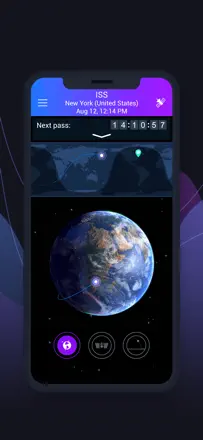
Satellite Tracker appeals to people who catch ISS passes: getting the station's trajectory and pass alerts is handy and clear. But the app fails the core expectation: people want to point their phone at the sky and identify any satellite overhead, yet without a subscription only the ISS is visible, not Hubble, not Starlink, none of the rest, plus ads on every tap, and sometimes ads shown even to active subscribers.
Points forts : ISS tracking and pass alerts, clear trajectory display, pleasant visualization
Reproches : Only the ISS visible without a subscription, can't point the phone to identify a satellite overhead, ads on every tap, ads and subscribe prompts even for active subscribers, no Apple Pencil support, can't isolate Starlink
Pour qui : People who want to catch ISS passes and get alerts about them
Rang 36. Note des avis : 45 sur 100. Note sur l’App Store : 4,8★ · 117 499 notes
45sur 100
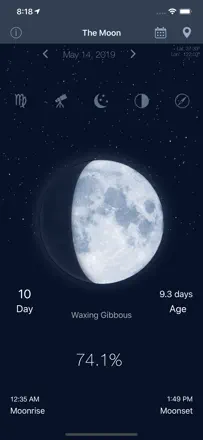
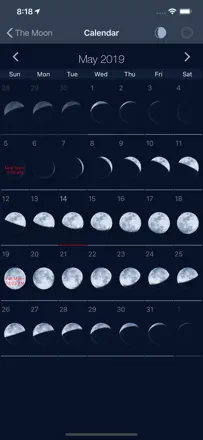
The Moon is praised for showing the Moon's phase right in the center the moment you open it, which suits anglers and hunters who time things by the phase. But the app is going through a wave of technical trouble: for many it opens and closes within 1-3 seconds, it froze one person's iPhone solid, and the tides section greets you with odd text like 'woman cycles synchronized with solar tides, probably'.
Points forts : Moon phase shown center-screen on launch, detailed phases for fishing and hunting, companion to morning meditation, quick visual phase check
Reproches : App crashes a couple of seconds after launch, froze a phone so it couldn't be powered off, strange text in the tides section, can't scroll back through dates, wrong distance to the Sun, murky pricing (1.99 turns into 19.29)
Pour qui : Anglers and hunters who track the Moon's phase, and people who follow the lunar cycle for their daily rhythm
Rang 26. Note des avis : 55 sur 100. Note sur l’App Store : 4,7★ · 850 notes
55sur 100
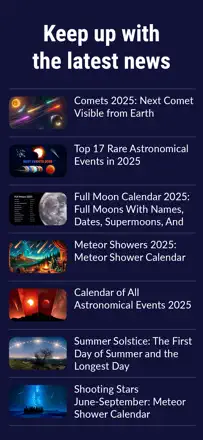
As a one-stop source of space news people genuinely love it: fresh, current, always something to read and learn. Ads kill it: full-screen popups on launch, videos auto-starting, switch to another app and come back and there's an ad again, and some who paid to remove ads still see them. People also complain the news leans mostly on SpaceX and skips other firms.
Points forts : Fresh current space news in one place, updated often, read-markers on stories, you learn new things
Reproches : Aggressive ads and launch popups, auto-playing videos, ads remain even after paying to remove them, app locks up, articles open in a browser with even more ads, SpaceX bias
Pour qui : Space fans who want to stay on top of the news and can stomach the ads or pay
Rang 12. Note des avis : 62 sur 100. Note sur l’App Store : 4,7★ · 1 689 notes
62sur 100
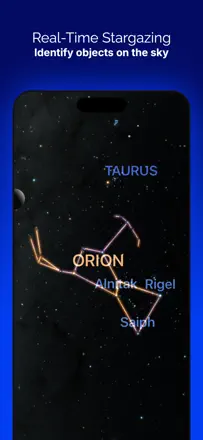
People value pointing the phone at the sky to match the picture with real stars, seeing the Moon below the horizon, and scrubbing dates to watch planets move. They also praise it for teaching kids and observing from light-polluted cities. It breaks on crashes after updates, a lost point-to-sky mode, and confusion over what is free versus paid.
Points forts : Pointing phone at sky to match stars, showing the Moon below the horizon, date scrubbing and planet motion, teaching kids, working in city light pollution
Reproches : Crashes after updates, lost point-to-sky mode, screen shaking, unclear what is free versus paid
Pour qui : Beginners and families with kids who want to point the phone at the sky and learn constellations even from a city