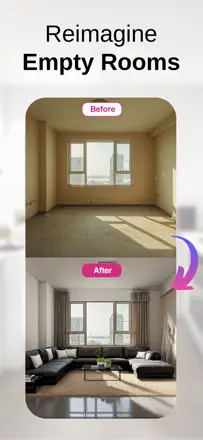
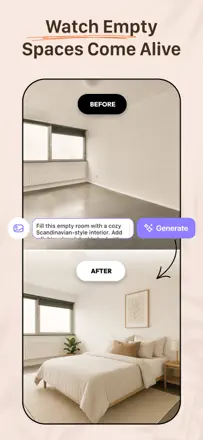
Homeowners redoing a room who want to see the result in advance
Quoi vérifier avant de choisir
Authors ask for the items they chose and the geometry to be kept while only the part of the room they mean is changed. The evidence includes both ignored instructions and a positive experience of a request being carried out.
Quelles apps les gens utilisent
Ces apps sont mentionnées dans le décryptage de cette tâche. Ouvre chacune pour comparer les points forts et les limites. L’ordre de la liste n’est pas un classement d’adéquation.
Rang 21. Note des avis : 48 sur 100. Note sur l’App Store : 4,5★ · 153 493 notes
48sur 100
The app helps quickly imagine a room in different styles, and people enjoy it as a way to daydream. But getting the result you want takes many redos, the images often don't fit the actual space, and uploading a room photo is slow. A common gripe: a ten-dollar weekly subscription feels steep, and many struggled to cancel on the first try.
Points forts : Quickly shows a room in different styles, fun to imagine a space, easy to get started
Reproches : Takes many redos to get the result, images don't always fit the real room, slow photo upload, can't design combined rooms
Pour qui : People who want a quick look at style options for a room and don't expect a precise plan
Rang 45. Note des avis : 30 sur 100. Note sur l’App Store : 4,6★ · 23 671 notes
30sur 100
Some people recall that a year ago the app produced beautiful, practical options and genuinely helped with a remodel. But after a model update the quality collapsed: blurry images, simple commands like add curtains or remove shelves are ignored, and it often draws extra walls and windows. Many flatly say ChatGPT now does it better.
Points forts : Used to produce beautiful, practical options, helps rough out several remodel versions, easy to use
Reproches : Quality dropped after the model update, blurry images, ignores simple commands, draws extra walls and windows, harsh daily limit, ChatGPT does it better
Pour qui : People who want to quickly toss out remodel ideas and can tolerate quality dropping after updates
Rang 41. Note des avis : 34 sur 100. Note sur l’App Store : 4,6★ · 5 853 notes
34sur 100
People come for a quick picture of how a room could look, and for some it genuinely helps pick out furniture and save on a designer. But the app barely listens to edits: it gives one shot, won't remove or add items on request, and plants windows and doors where none exist. There's also a hard weekly generation limit you only discover after paying.
Points forts : Fast remodel ideas, helps pick furniture yourself and save on a designer, fun to browse variants
Reproches : Ignores edits, gives one variant instead of a back-and-forth, adds windows and doors that aren't there, hidden weekly generation limit, off room proportions
Pour qui : For people who want a one-off idea of a room's style and don't expect precise control over details
Rang 37. Note des avis : 38 sur 100. Note sur l’App Store : 4,5★ · 20 394 notes
38sur 100
People use it to preview new furniture, wall colors and finishes on their own room photos, and it does help at times («now I know how to remodel my kitchen»). But once you get to floor plans it redraws the layout wrong, puts a bed in a closet and a toilet mid-wall, and the edit button just regenerates the image. There is also no free tier and plenty of complaints about charges you can't undo.
Points forts : Furniture and decor ideas, wall color options, budget-to-luxury variants per room, works from your own photos
Reproches : Misreads floor plans, no precise edits to a result, edit button just regenerates, no free entry, refunds are hard
Pour qui : For people who want a quick preview of finishes and furniture from a room photo, not for accurate space planning
Rang 20. Note des avis : 52 sur 100. Note sur l’App Store : 4,4★ · 3 552 notes
52sur 100
People like how simple and fast it is, it is genuinely fun to play with and sketch out ideas. But it does not really decorate the room, it redraws it from scratch: it moves doors and windows that cannot move, loses the cathedral ceiling and the baby crib in the photo. Many complaints about charges after cancelling the trial.
Points forts : Simple and fast interface, easy to sketch ideas, fun to play with
Reproches : Redraws the room instead of decorating it, moves doors and windows that cannot move, ignores key details in the photo (crib, high ceiling), no way to add your own text note, charges after cancelling the trial
Pour qui : For people who just want to quickly sketch a couple of ideas from a photo and do not need accuracy to the real layout.
Rang 25. Note des avis : 45 sur 100. Note sur l’App Store : 4,7★ · 2 117 notes
45sur 100
People praise it for being intuitive and for working even with imperfect photos, it cleanly removes furniture from the frame and offers unexpected ideas. But it seriously mishandles scale (a 4-foot keyboard fills the whole room), ruins the background in virtual staging (blurs trees, adds houses), cannot hold more than one request, and often erases stairs or puts a couch in front of a door.
Points forts : Intuitive interface, works even with imperfect photos, cleanly removes furniture from the frame, unexpected ideas, fast processing
Reproches : Mishandles object scale, ruins the background and adds stray objects, cannot hold more than one request, erases stairs and puts furniture in front of doors, errors and «high demand» on the paid version, small limit on the free one
Pour qui : For people who want to quickly rough out decor ideas from a photo, but not for accurate virtual staging of a home for sale.
Rang 31. Note des avis : 40 sur 100. Note sur l’App Store : 4,6★ · 29 902 notes
40sur 100
The app gets praise as a way to see a room before an expensive redo and to let your imagination run. But the core failure is that it changes the layout itself, not just the decor: it removes walls, fills in a pool, adds windows, even when someone only asked to rearrange furniture. It also ignores simple commands and pushes hard toward expensive payment with no real free mode.
Points forts : Helps see a room before an expensive redo, fun to let imagination run, decent decor options at times
Reproches : Changes the layout instead of the decor, ignores simple commands, uses one angle not the whole room, no real free mode, charges after cancellation
Pour qui : People who want a quick take on decor for an empty space and can live with the app reshaping the room