Automatically get clean subtitles under a video, including for the deaf and hard of hearing, or to translate someone else’s clip into their language with minimal manual fixing
The reviews describe phrases that were skipped and errors in the direction of writing. The source language, the timing and the final export need checking, especially for accessibility captions.
Quelles apps les gens utilisent
Ces apps sont mentionnées dans le décryptage de cette tâche. Ouvre chacune pour comparer les points forts et les limites. L’ordre de la liste n’est pas un classement d’adéquation.
Rang 13. Note des avis : 58 sur 100. Note sur l’App Store : 4,6★ · 3 905 notes
58sur 100
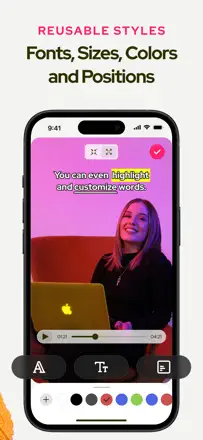
People grab it to slap captions on social videos fast, and for that core job it delivers: auto-transcription around 80% accurate, flexible text, fonts, colors, and any aspect ratio. It breaks on speed and reliability: for some it stalls 10-30 minutes on a one-minute clip or fails entirely, and the watermark sometimes won't lift even after paying.
Points forts : Fast speech auto-transcription, simple interface, font and color control, free text placement, multiple aspect ratios, Chinese caption support
Reproches : Transcription sometimes drags 10-30 minutes or freezes, watermark stays after paying, auto-captions mishear some words, feels like a rushed macOS port
Pour qui : People cranking out short social clips who want captions on fast without deep editing
Rang 37. Note des avis : 28 sur 100. Note sur l’App Store : 4,4★ · 1 609 notes
28sur 100
When it works, creators like the speech recognition and font choices for captions. But there's almost no stability: uploads hang at 99% with a PrimaryAPIError, the app crashes on word-by-word animations, projects won't reopen, and captions come out without a single comma or capital letter, unusable for real work.
Points forts : Decent speech recognition, rich font choice, captions burned into the clip, fast when it works
Reproches : Uploads hang at 99% with an error, crashes on word-by-word animations, projects won't reopen, captions with no commas or capitals, captions out of sync with audio
Pour qui : People who want stylish captions on short clips and can tolerate frequent failures
Rang 30. Note des avis : 40 sur 100. Note sur l’App Store : 4,6★ · 1 999 notes
40sur 100
People pick it for auto-captions on longer clips, and the speech recognition gets praised even with noisy audio. The weak spot is the approach itself: some sentences get skipped and have to be typed in by hand, the 5-minute cap and portrait mode annoy on iPad, and on songs auto-captions barely work.
Points forts : Accurate speech recognition even in noise, support for longer clips, simple clear interface, responsive devs on small fixes
Reproches : Skips some sentences that must be typed in manually, 5-minute cap on free, stuck in portrait on iPad, barely works on songs, thin position and font customization
Pour qui : Creators making YouTube and social clips who need auto-captions for regular speech, not music
Rang 3. Note des avis : 68 sur 100. Note sur l’App Store : 4,7★ · 1 439 notes
68sur 100
The main value is speed: subtitles for a long video, even an hour long, are ready in minutes, and for people like those making medical education clips that saves real time. Accuracy is decent in English but drops on quiet and non-English speech, and local transcription on Mac stalls. The sore spot that costs it five-stars is export: some people found the captions vanished from the finished file on playback.
Points forts : Fast subtitles even for hour-long videos, good English accuracy, simple clear preview, handy subtitle splitting
Reproches : Captions disappear from the exported file, slow and stalling local transcription on Mac, weak on quiet and non-English speech, can't add custom fonts, pricey for a thin feature set
Pour qui : People who regularly caption long videos for study or work and value speed over fine-grained control.
Rang 22. Note des avis : 50 sur 100. Note sur l’App Store : 4,8★ · 399 notes
50sur 100
It recognizes captions noticeably more accurately than rivals, catching your words even with noise and a second speaker far off, and that's what gets praised. But exporting the finished clip drags on for 40 minutes, stalls at 70 percent, and locks up the phone while it runs. The subscription also grates: you can't customize captions or download the video without a yearly payment, and after buying premium people run into a daily limit.
Points forts : Accurate speech recognition even with noise and a distant second voice, beautiful subtitle designs, translation, a simple fast interface
Reproches : Export takes 40 minutes and stalls near the end, freezes the phone, Arabic text comes out reversed, caption customization and downloads only on a yearly subscription, daily limit after paying for premium
Pour qui : People who care about accurate auto-captions and pretty subtitle design and can put up with slow exports and a yearly subscription
Rang 15. Note des avis : 58 sur 100. Note sur l’App Store : 4,6★ · 375 notes
58sur 100
The auto-captions really are handy and simple, you can move the video and text layers around the canvas, and support responds fast and fixes issues, which is what people value. But on longer clips the export drags and crashes before finishing, finished subtitles sometimes vanish after saving, and the output resolution is worse than the preview. People are also annoyed that a subscription is forced for the most basic thing, adding subtitles.
Points forts : Simple accurate auto-captions, you can move video and text layers around the canvas, responsive fast support, handy for short social clips
Reproches : Export crashes on long videos, subtitles disappear after saving, output resolution worse than the preview, subscription forced for basic subtitles, lip-sync lag, updates remove features
Pour qui : People making short social clips who want simple auto-subtitles with control over where the text sits in the frame
Rang 35. Note des avis : 32 sur 100. Note sur l’App Store : 4,5★ · 2 304 notes
32sur 100
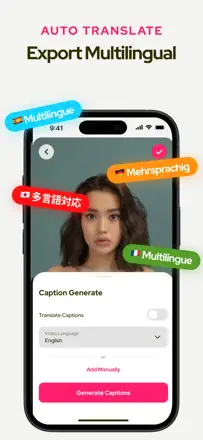
The idea is useful: drop in a foreign-language clip and get a translation with captions, and for some it served for years on videos from friends. But translation quality often fails from Italian, Spanish and Bengali, the app freezes and loses hours of work, and even after paying a remaining-minutes counter keeps ticking.
Points forts : Translating foreign-language clips, auto-captions on video, decent recognition with clear speech, responsive support for some, years of use on friends' videos
Reproches : Translation often inaccurate from Italian, Spanish and Bengali, freezes losing hours of work, minutes counter keeps ticking even after paying, strips audio from the clip without an upgrade
Pour qui : People who receive foreign-language clips and want to quickly understand them with captions in their own language