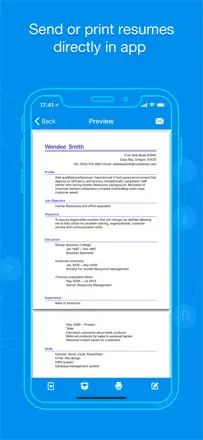
Authors describe an empty attachment and sending that doesn’t work. What is needed is an independent way to save the file and open it through the system share sheet.
Quelles apps les gens utilisent
Ces apps sont mentionnées dans le décryptage de cette tâche. Ouvre chacune pour comparer les points forts et les limites. L’ordre de la liste n’est pas un classement d’adéquation.
Rang 14. Note des avis : 38 sur 100. Note sur l’App Store : 3,4★ · 927 notes
38sur 100
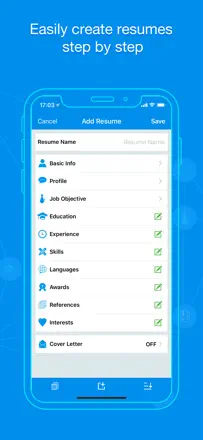
The app has been around for years and has built a loyal user base among people without computers. The template selection is broad and mostly free. The main systemic problem is that experience entries cannot be sorted by date the app lists them in the order they were entered, which breaks chronological ordering. This is not a UI bug but a missing sort feature.
Points forts : Most templates are free. Acts as a computer substitute for people who do not have one. Quick start without registration.
Reproches : Experience entries cannot be reordered, so the resume ends up with broken chronology. Backspace in a description field sometimes deletes the entire paragraph. A review prompt pop-up blocks access to the resume and cannot be closed.
Pour qui : Someone without a laptop who needs a basic resume for a job application with no ATS or design requirements.
Rang 10. Note des avis : 42 sur 100. Note sur l’App Store : 4,8★ · 754 notes
42sur 100
A long-running app aimed at users without a computer. Template fill-in is fast and the PDF output is clean. The consistent weak point is export reliability: email attachments arrive empty, uploading to Monster requires a separate registration, and direct upload to third-party platforms is not available. Saving an edited template as a new file is not possible.
Points forts : The simplest flow possible: pick a template, fill in fields, print. Gets the job done for anyone who needs a paper resume.
Reproches : Email attachments arrive empty the resume is lost after filling in. Direct file upload to job sites without going through Monster registration is not available. An edited template cannot be saved as a separate file.
Pour qui : A candidate applying for roles that accept paper or printed resumes and are not screened by ATS.
Rang 12. Note des avis : 38 sur 100. Note sur l’App Store : 4,9★ · 17 427 notes
38sur 100
A simple CV editor with an approachable interface, but with a critical flaw: the export and send function often fails entirely emails do not go out and the send button is inactive. Several users have lost their resume with no way to recover it. Positioned for the UK market (CV format with photo and personal details), but the templates do not fully match that format.
Points forts : The interface needs no learning curve a first-time resume writer can manage independently, the steps are obvious.
Reproches : The built-in CV email function does not work for a significant portion of users. Data is lost without warning.
Pour qui : A user without a laptop who needs to build a CV entirely on their phone assuming export works.
Rang 9. Note des avis : 44 sur 100. Note sur l’App Store : 4,8★ · 1 820 notes
44sur 100
The app bills itself as free and actually delivers on that no payment required. But Dropbox and iCloud sync is unreliable: data is lost when switching between devices. The PDF sometimes gets rejected by job sites.
Points forts : Genuinely free export, fast to fill in, clean interface.
Reproches : Cloud sync drops data when switching between iPhone and iPad. Editing an existing resume is non-obvious users end up creating a new one instead of updating the old one.
Pour qui : Someone who wants a resume without paying and does not plan to switch devices frequently.
Rang 19. Note des avis : 28 sur 100. Note sur l’App Store : 4,6★ · 1 126 notes
28sur 100
The editor offers voice input and a few basic templates, but export is locked behind a paywall with no warning until the very end. Experience sections cannot be sorted and blocks cannot be moved. Template designs are closer to the Word 95 era.
Points forts : Voice input speeds up text entry. The interface is simple enough for users with no Word experience.
Reproches : PDF export is hidden behind a paywall that only appears after the entire resume is filled in. Experience entry order is fixed and cannot be changed. Templates are outdated and cannot be structurally edited.
Pour qui : Someone without a computer who needs to put together a basic resume once, quickly, with no design expectations.