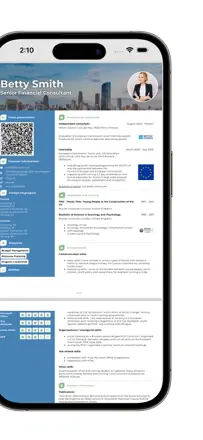
In the reviews people ask for a long CV and extended sections. It helps to test a multi-page document, the publications and the exported result, while keeping manual settings.
Quelles apps les gens utilisent
Ces apps sont mentionnées dans le décryptage de cette tâche. Ouvre chacune pour comparer les points forts et les limites. L’ordre de la liste n’est pas un classement d’adéquation.
Rang 1. Note des avis : 60 sur 100. Note sur l’App Store : 4,7★ · 3 891 notes
60sur 100
The best templates in this category by far: unconventional layouts that stand out from generic ATS-friendly one-pagers, making them a solid pick for creative and design-oriented fields. The AI assistant rewrites job descriptions into cleaner, sharper language. The mobile experience is noticeably weaker than the web: crashes during editing, no back button, and preview is thumbnail-only.
Points forts : A wide range of distinctive templates plus an AI rephrasing tool for experience descriptions both tools genuinely speed up writing.
Reproches : The mobile editor crashes when typing in the experience field, there is no full-size document preview, and there is no back button.
Pour qui : Someone who wants a template that does not look like everyone else's and is comfortable finishing the resume on a desktop.
Rang 4. Note des avis : 56 sur 100. Note sur l’App Store : 4,8★ · 1 495 notes
56sur 100
A lightweight editor with a sensible structure and clean, watermark-free templates. Two free exports is a fair threshold. The AI rephrasing feature is available as a paid add-on and is not pushed aggressively. The weak point is rigid bullet formatting in the experience section that cannot be removed or reformatted.
Points forts : Templates without watermarks, actual employer callbacks noted by several users, and fast updates for a specific role.
Reproches : Forced bullet points in the experience section cannot be turned off, section titles cannot be changed, no cover letter.
Pour qui : Someone who needs to update their resume quickly for a new role without fiddling with settings.
Rang 8. Note des avis : 44 sur 100. Note sur l’App Store : 4,8★ · 39 267 notes
44sur 100
AI suggestions while editing text work and are valued, but PDF export is systemically broken the resume disappears or fails to open after generation. The font in print view shifts, and capitalization changes on its own. Not reliable for the core task of downloading and sending.
Points forts : AI rewrites and improves job responsibility text right in the editor users say it speeds up the process.
Reproches : PDF export is unstable: the file does not save, fonts and capitalization shift in print view, and support is unreachable.
Pour qui : Someone who wants help with wording but is prepared to run the final document through a different tool to actually get the file.
Rang 16. Note des avis : 34 sur 100. Note sur l’App Store : 4,8★ · 13 672 notes
34sur 100
The web version works well and produces clean templates, but the mobile app is a separate product with systemic crashes: trying to open or save a resume closes the app and loses progress. For the mobile audience it is effectively unusable.
Points forts : Templates are clean and readable, the input structure is straightforward, and the fill-in process raises no questions.
Reproches : The mobile app crashes when opening a saved resume or saving new data progress is lost without warning.
Pour qui : A user who works through a browser on a computer and just wants to download a PDF.
Rang 5. Note des avis : 52 sur 100. Note sur l’App Store : 4,5★ · 1 542 notes
52sur 100
The AI assistant builds resume sections through a Q&A flow. Importing an existing resume is destructive: it collapses job titles into generic versions and drops details. The coin-based monetization layered on top of a subscription frustrates users who are already paying.
Points forts : The Q&A format lowers the barrier for people who do not know where to start, and produces a result in about 5 minutes.
Reproches : Importing a resume overwrites original job titles with generic placeholders. Academic CV format (long-form) is not supported.
Pour qui : A job seeker writing their first resume who needs guidance on what to include.