People who find it hard to hold on to a plan and to get started
Quoi vérifier avant de choisir
A situation that comes up in the reviews: the alert has sounded, but the person no longer remembers what needs doing. A reminder with clear content and a short step through to the action can help.
Quelles apps les gens utilisent
Ces apps sont mentionnées dans le décryptage de cette tâche. Ouvre chacune pour comparer les points forts et les limites. L’ordre de la liste n’est pas un classement d’adéquation.
Rang 13. Note des avis : 71 sur 100. Note sur l’App Store : 4,8★ · 161 305 notes
71sur 100
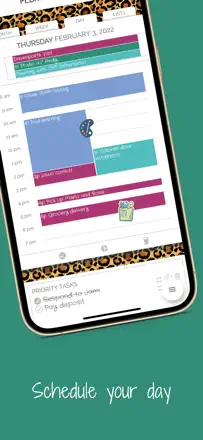
Structured is the best visual time-blocker for people who need to see their whole day on one screen. Three timers per task, color blocks, and time gaps are exactly what helps ADHD users not lose an hour. The main barrier: adding a task requires setting a time, which is psychologically difficult for unstructured to-do lists. After a major update some users lost their settings.
Points forts : Three notifications per task (before start, at start, at end) give real control over time. Unoccupied gaps in the day are visible. Prevents over-scheduling. Integration with Apple Calendar and Reminders pulls everything into one place.
Reproches : Every task requires an exact time, which does not work for people with open-ended schedules. After updates it has lost user settings and hidden features behind a new paywall. Causes the device to overheat during long sessions on MacBook.
Pour qui : People with ADHD, anxiety, or OCD who need to see the day structure visually. Not suitable for those who work with a fluid task stream and no time anchors.
Rang 4. Note des avis : 79 sur 100. Note sur l’App Store : 4,8★ · 105 128 notes
79sur 100
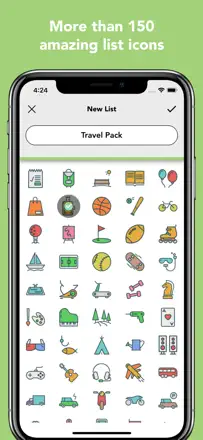
Lists To Do does one thing: lets you add a task in one tap with no setup and no account. That is exactly what students and people with ADHD value when bulky systems stop them from starting. The list lives only on the phone with no sync.
Points forts : Add a task in one tap with no menus. Multiple lists with custom labels and icons. Time-based reminders fire reliably. The app does not slow down or freeze.
Reproches : No cross-device sync: the list stays on the phone only. Tasks cannot be manually reordered after creation. Editing an already entered item is cumbersome. No attachments or notes on a task.
Pour qui : Students, people with ADHD, and anyone who needs a quick checklist without accounts or payments. Not for cross-device sync or team use.
Rang 19. Note des avis : 65 sur 100. Note sur l’App Store : 4,8★ · 14 497 notes
65sur 100
A unique combination of a Pomodoro timer and a task list with gamification: coins, trees, and stats. Acts as an external motivator for people with ADHD and procrastination. Task order in the list cannot be fixed, and Watch control is rough.
Points forts : Coins and visual progress keep you working better than a plain timer. Day-by-day stats make the real volume of work visible. No intrusive banners even in the free version.
Reproches : Task order in the Today list resets and requires manual dragging. Timer control from Apple Watch is unstable. Completed task data sometimes disappears entirely.
Pour qui : Students and freelancers with ADHD or a tendency to procrastinate who need game mechanics to enter a work mode.
Rang 16. Note des avis : 68 sur 100. Note sur l’App Store : 4,7★ · 14 815 notes
68sur 100
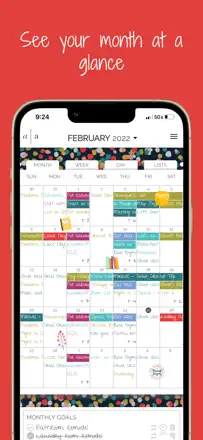
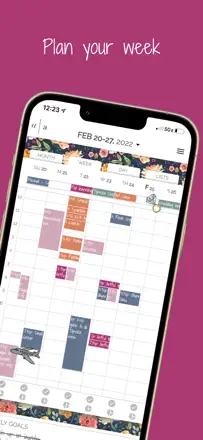
A digital planner for people who care about how their tool looks. Stands out with a full month view broken down by hour, multi-calendar integration, and easy drag-and-drop of tasks. Weak point is speed: the interface starts to lag with a high volume of events.
Points forts : Full month view with day-level detail right in the grid, simultaneous display of multiple synced calendars, aesthetics reminiscent of a paper planner.
Reproches : Becomes slow and unwieldy with a large number of events. The web version is significantly worse than the mobile app. Some users were charged without authorization after canceling a trial.
Pour qui : Organized women and people with ADHD who need to see the full month at a glance and want a digital planner with the feel of a paper one.
Rang 8. Note des avis : 76 sur 100. Note sur l’App Store : 4,7★ · 10 092 notes
76sur 100
A home cleaning planner with gamification, virtual rewards, and task assignment by room and family member. Solves the specific problem of cleaning paralysis by breaking tasks down and giving a clear schedule. Particularly effective for people with ADHD. Weak points: notifications do not say which task to do, and account sync sometimes breaks on reinstall.
Points forts : Breaks cleaning into rooms with a frequency schedule. Gamification through points and a virtual store creates a dopamine loop. The family starts participating when they see shared progress.
Reproches : Notifications are always generic ('time to clean'), they do not name a specific task. Apple account sync sometimes resets on reinstall and loses settings. Initial setup takes a long time.
Pour qui : People with ADHD, multi-member households, and anyone overwhelmed by domestic chores who needs external structure to stay motivated.